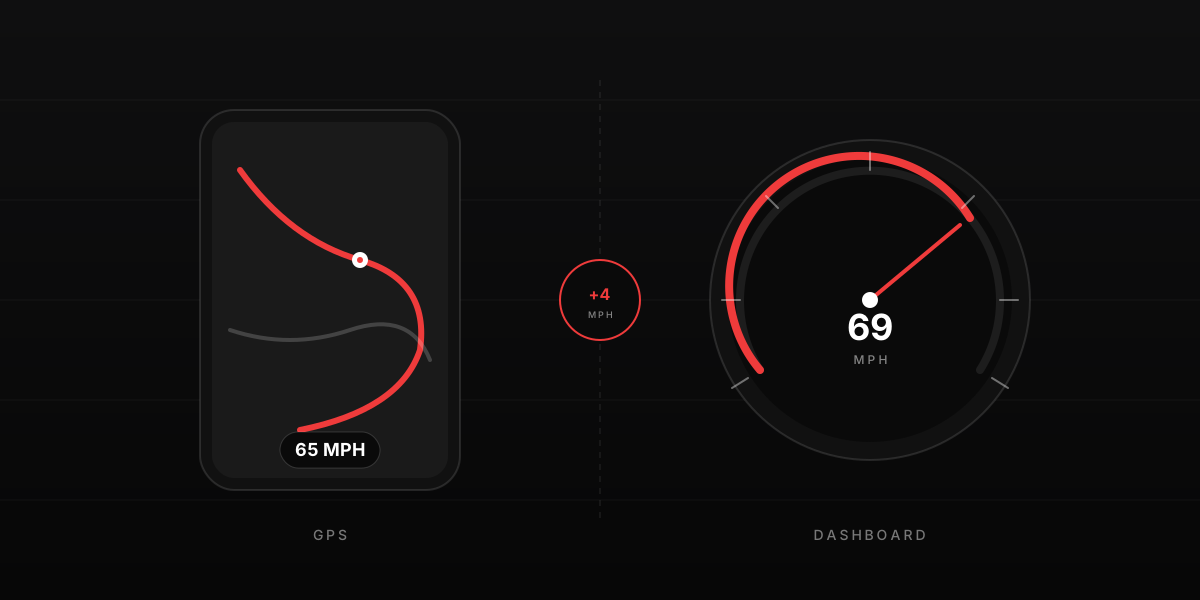
Open Google Maps in your car. The number on screen is almost always 3 to 5 mph lower than the one on your dashboard. The gap is not a bug in Google Maps and not a defect in your car. Both numbers are correct for what they are measuring. They just are not measuring the same thing.
What your car is showing
A car speedometer measures how fast the wheels are turning, then multiplies by a constant to get a speed in mph or kph. The constant depends on tire diameter. With factory tires at factory pressure, the math is calibrated by the manufacturer to read a few mph higher than your real ground speed — intentionally. The reason is a regulation that almost every car-making country has signed up to.
In Europe, UNECE Regulation 39 says a speedometer may never read below true speed, and the displayed speed may exceed true speed by at most 10% plus 4 kph. In the United States, FMVSS 101 sets a similar one-way tolerance. Japan, China, Australia and most other markets follow the same principle. Faced with a one-way tolerance, every manufacturer deliberately calibrates the dashboard a few mph high to guarantee compliance across a range of tire conditions. We cover the regulation and the math in detail in why your car's speedometer reads different from GPS.
So at an indicated 70 mph on the dashboard, your true ground speed is typically 65 to 68 mph. Not because the car is broken — because the car is following the law.
What Google Maps is showing
Google Maps does not look at your wheels. It reads speed directly from your phone's GPS chip. GPS calculates speed in two ways. The simple way is to compare two consecutive position fixes and divide distance by time. The accurate way — the one modern chips actually use — is to measure the Doppler shift in the radio waves coming down from the satellites and derive your velocity directly from that shift. Doppler-based GPS speed is accurate to within roughly 1 mph under open sky.
Because GPS speed depends on satellite physics rather than tire diameter, it does not drift when your tires wear, when you change wheels, or when you drive with low pressure. The number Google Maps shows is true ground speed, give or take a small measurement error. We cover the GPS speed pipeline in detail in how accurate is GPS speed in your phone.
What Waze is showing
The same thing as Google Maps. Google owns Waze (acquired in 2013) and consolidated the location pipeline several years ago. When you open Waze and Google Maps side by side, the speed readings agree within a fraction of a mph. Any visible difference is rounding (Waze rounds to the nearest whole number, Google Maps sometimes shows a tenth) or one app updating its display a beat before the other. There is no measurement difference.
What Apple Maps is showing
Apple Maps reads speed from the same Core Location API in iOS that Google Maps uses on an iPhone. The underlying source is the same hardware: the iPhone's multi-constellation GPS receiver, which uses GPS, GLONASS, Galileo, and BeiDou signals simultaneously. Speed readings from Apple Maps, Google Maps and Waze on the same iPhone are essentially identical. The visible differences are display style and smoothing strategy, not underlying measurement.
Why the readings sometimes lag
GPS speed is noisy by nature. Satellite signals bounce off buildings, fade in tree cover, and weaken when only a few satellites are visible. To avoid a jittery display, every navigation app applies a smoothing filter that averages recent readings. The cost of smoothing is a 1 to 3 second lag when you accelerate or brake hard. Your car dashboard updates from wheel rotation almost instantly, so during rapid changes the two readings look out of sync. Hold a steady speed for a few seconds and they converge — at which point the dashboard's built-in offset becomes visible as a stable gap.
Speed can also drop to zero or jump wildly in three specific situations: tunnels (where GPS signals are blocked entirely), tight urban canyons where signals bounce off skyscrapers and arrive out of phase, and very low speeds below about 5 mph where the noise in GPS readings is larger than the actual motion.
Which is the real speed?
For "how fast am I actually moving across the road right now," GPS is the more accurate answer. It measures actual ground velocity. The dashboard measures wheel velocity and multiplies by a number, which is correct only if the assumed tire diameter is correct.
For legal enforcement, neither number is what gets you a ticket. Police use radar or lidar, which measure your speed directly against the surface of the vehicle using independent equipment. The takeaway: do not assume that because your dashboard reads 70 mph and the limit is 65 mph, you are speeding by 5 mph. You may actually be at 67 mph, which is the same number Google Maps and a police radar would both report.
If you want to know exactly how big your dashboard's offset is on your specific car with your specific tires, the easiest way is a 10-minute GPS test. We walk through the process step by step in how to test your speedometer accuracy, and you can do the same test using the car speed test page on this site.
The takeaway
Google Maps shows you true GPS speed. Your car shows you a deliberately conservative version of true speed. The 3 to 5 mph gap is the safety margin the law requires. Both numbers are doing their job. Once you understand which is which, you can read your dashboard with a little mental subtraction and stop worrying that one of them is broken.
To see GPS speed in the browser with nothing installed, open the live speedometer on your phone. To check your dashboard's offset against GPS in 10 minutes, run the car speed test. If the speed readout is missing from Maps altogether, our guide to turning on the Google Maps speedometer has the iPhone and Android settings paths.